Temporary Phone Numbers: A Step-by-Step Guide to Verification and Recovery
A temporary number can help with a short, permitted verification task. The important question is not simply whether the first SMS arrives. It is whether the access period, message permissions and recovery arrangements match what you need to do.
This guide takes you through the process in order: define the task, choose the access model, protect the account, complete a controlled verification and close the dependency before the number expires. Use it for systems you own or are authorized to manage.
Outcome: By the end, you should have a documented access plan, a small test record and a clear decision about renewal, replacement or retirement.

Step 1. Define the task and the required access period
Write a short task brief before buying anything. Include the destination platform, the account owner, the reason for verification and the date until which access must remain available. A disposable test account and a permanent business account should not use the same recovery plan.
Ask what happens at the next verification request. Record who controls the number, when access ends and which recovery option remains.
For an important account, prefer a durable number under the organization's control. A temporary option belongs in a limited workflow only when the platform permits it and losing the number will not strand valuable data or access.
Set permissions and spending limits
Set a maximum spend and name the person authorized to approve additional orders.
Check the destination's rules separately: buying a number does not grant permission to ignore another service's registration requirements.
Checkpoint: The owner, permitted use, deadline and spending limit are recorded before an order is placed.
Step 2. Match the task to the right number service
One-time activation
An activation is intended for a particular verification task. Check the selected service, country, message allowance and completion window before ordering. Do not assume that a successful activation gives you continuing access to the same number.
Use activation for a task with a clear end, not as the sole recovery method for a lasting account.
Service-specific rental
A rental tied to a service may be relevant when repeated messages are needed during a defined period. The important questions concern duration, renewal, expiry and exactly which messages the rental covers.
The rental period describes access to the number, not guaranteed acceptance by the destination. Confirm both conditions separately.
Full-number rental
A broader rental may support messages associated with several services, depending on the provider's conditions. That still does not establish permanent ownership, number portability or support for calls.
For example, Anosim's temporary-number services describe SMS Activation, Rent Service and Rent Number as separate options. The site also describes a proprietary API and a compatibility API for existing SMS-Activate integrations. Those distinctions provide a starting point for matching access to a task; they do not establish that any particular platform will accept a number or that an account will remain accessible indefinitely.
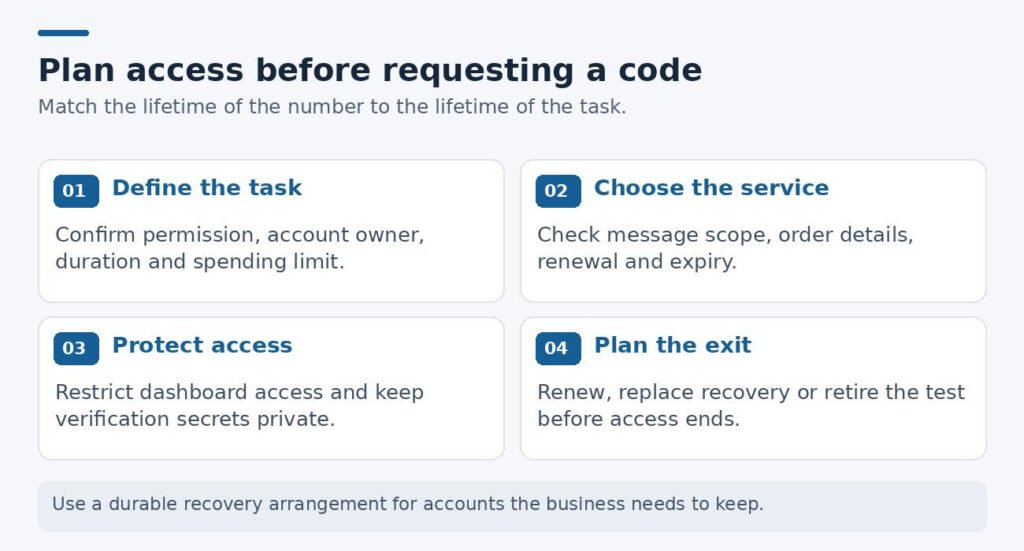
Figure 1. Four decisions to make before using a number for an authorized verification task.
| Intended task | Access requirement | Decision to make first |
|---|---|---|
| Authorized signup test | One defined verification window | Can the test account be safely retired? |
| Repeated verification during a project | Access for the full project period | Is renewal available on acceptable terms? |
| Company account recovery | Continuing control and backup access | Would losing this number interrupt the business? |
| API-based testing | Documented order and message states | Can the integration stop safely on errors? |
Checkpoint: The selected service covers the required messages and duration; renewal and expiry conditions are understood.
Step 3. Protect the account before requesting a code
Check who can read incoming messages and who can access the provider dashboard. Keeping your personal number out of a form does not automatically make the replacement channel confidential. Review exclusivity, logging and expiry conditions before sending a security code.
Do not use public SMS inboxes for valuable accounts. For private rentals, confirm exclusivity and post-expiry handling; the word 'private' alone does not establish either.
The NIST digital identity guidance treats authentication over the public telephone network as a restricted method and discusses risks such as SIM changes and number porting. This is not a statement that every SMS use is prohibited. It is a reason to avoid treating an SMS code as the strongest available protection.
Where the destination supports them, consider passkeys or security keys alongside a documented recovery process. Also protect the number provider's dashboard: a weak dashboard password can undermine an otherwise careful setup.
Checkpoint: Dashboard access is restricted, messages are not public, and valuable accounts have a suitable recovery plan.
Step 4. Complete one controlled verification
Open the order details and confirm the service, country, access period and selected number. Save the order identifier and expiry time in your working record. Keep the number, account password and verification code out of shared screenshots and public chats.
Request the message through the destination's normal process. Follow its waiting period rather than repeatedly clicking resend. When a code does not arrive, investigate the order status and support instructions before purchasing another number.
Record the result without keeping secrets
Enter the code only into the intended service. Do not forward it to a person claiming that they need it to "finish" the process. In team records, note success or failure without storing the code itself.
For a development test, record useful evidence: whether the message arrived, whether the code was accepted and whether the account reached the expected state. This is more informative than a screenshot of a successful login with sensitive details exposed.
Checkpoint: The record shows whether the message arrived and the intended task finished, without exposing the code.
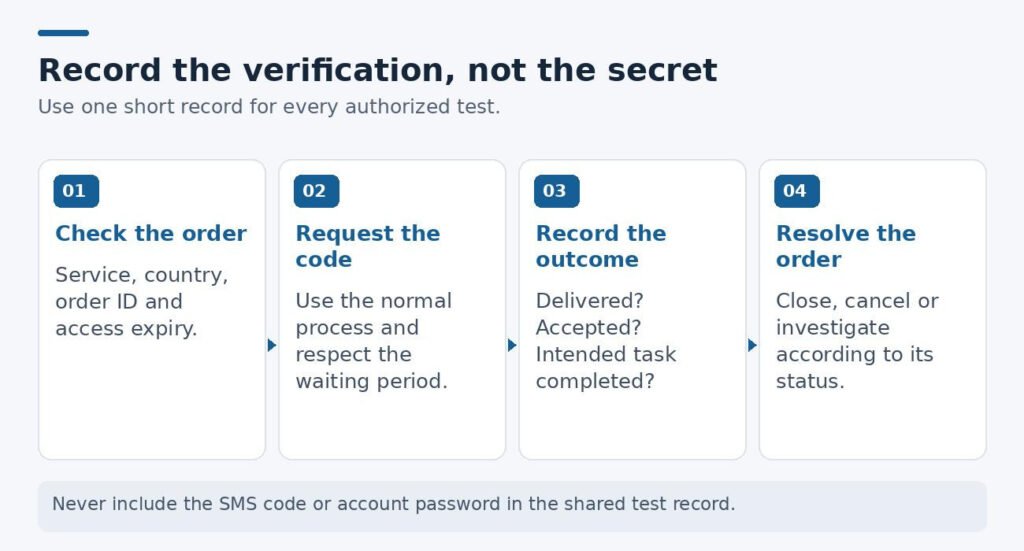
Figure 2. A simple verification record separates the order, the message and the final outcome. Do not store the code itself.
Step 5. Test failures and calculate the real cost
For a product you own, turn the pilot into a short list of test cases rather than a large batch of registrations. Include successful delivery, a delayed message, an incorrect code, an expired code and an order that is cancelled before completion.
The team then records the expected result for each scenario. An expired code should not complete registration. A cancelled order should not trigger endless polling. A failed attempt should produce an understandable message rather than leave a user guessing what to do next.
These are suggested test cases, not measured provider results. Test failure handling as well as successful delivery.
Stop at the budget limit, an unexpected charge or a rejection of the number type. Investigate before ordering again.
Compare cost per completed task
A low activation price is only one part of the decision. The useful comparison includes failed attempts, the refund process, staff time and the cost of maintaining access for as long as the account needs it.
Consider a purely illustrative purchase: ten attempts cost $0.40 each, and eight complete the intended task. Before refunds or staff time, the cost per completed task is $4 divided by eight, or $0.50. Those figures are an example, not Anosim pricing or a measured success rate.
Ask whether an unsuccessful attempt is refunded to the original payment method or returned as account credit. Check whether unused balances expire and whether a longer rental renews automatically. Save the relevant order conditions so the team can reconcile charges later.
Keep a recurring-work log of completed tasks, unresolved orders and actual spend.
Checkpoint: Unsuccessful orders have an owner, a stopping rule and a documented cost or refund outcome.
Step 6. Add automation only after the manual process works
Introduce API access only when the team understands the manual order lifecycle. Map the states your integration will encounter: requested, waiting, completed, cancelled and failed, using the provider's actual documented names. Decide which transitions require a human review.
Keep API credentials out of shared documents and screenshots. Use the documented polling interval, set an overall timeout and prevent multiple workers from placing duplicate orders for the same task. Give a human a clear way to stop the process.
A compatibility API may handle edge cases differently. Test completion, cancellation and errors before increasing volume.
Checkpoint: The integration has timeouts, controlled polling, duplicate-order protection and a manual stop.
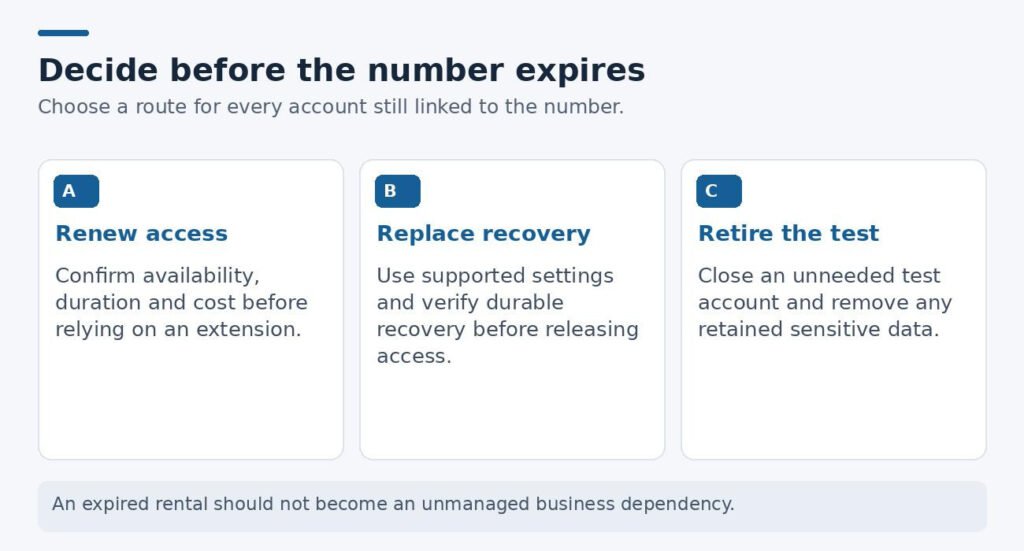
Figure 3. Before access ends, choose a documented route: renew, replace recovery details or retire the test account.
Step 7. Resolve account recovery before access expires
Review every account that still depends on the rented number before the access period ends. Where the account is being retained, use the platform's supported settings to establish a durable recovery method. Verify that change before allowing the old number to expire.
Google's account-recovery guidance recommends a recovery mobile number that belongs only to you and that you use regularly. The broader lesson is useful for any business: recovery should rely on something the account owner can continue to control.
Checkpoint: Retained accounts no longer depend on access you are about to lose; temporary accounts are retired safely.
Keep access aligned with the life of the task
A useful temporary-number workflow ends with control, not just a delivered SMS. Choose the right access period, document what happened and resolve recovery before expiry. For an account the business needs to keep, lasting control matters more than the cheapest activation.