Mobile Proxy Testing: A Step-by-Step Guide to Setup, Sessions and Troubleshooting

A different IP address is not a test result. To learn whether a landing page, login journey or regional offer works correctly, you need a defined scenario, a known starting point and a record of the connection used.
This guide explains how to use mobile proxies for authorized website checks without confusing network behavior with device behavior. Work through the steps in order, changing one important variable at a time.
Outcome: The goal is a repeatable test that another team member can run, investigate and explain—not a claim of unrestricted access or guaranteed performance.

Step 1. Write the test brief and capture a baseline
Choose one question that has a clear answer. For example: does an owned landing page show the approved offer for the intended market? Record the authorized destination, expected result, test period and person responsible for reviewing failures.
Exclude unrelated activity. A regional page check does not require bulk account creation, attempts to bypass access controls or repeated requests to third-party services that have not authorized the work.
Capture the normal-connection baseline
Run the same journey through your normal connection and record what happens. Save the browser version, time, page address and relevant settings.
Use the baseline to distinguish a network problem from a fault already present on the site. Record the difference, not just that the proxy test failed.
Checkpoint: The scenario, expected result and baseline are saved before the proxy configuration is introduced.
Step 2. Understand the network path and inspect the listing
A forward proxy sits between a client and a destination. The client sends traffic through the proxy, which forwards it onward. Cloudflare's explanation of forward and reverse proxies is useful for separating this client-side arrangement from a reverse proxy that sits in front of a website's servers.
With a mobile proxy, the onward connection uses mobile-network infrastructure. This changes the route and the network address presented for proxied traffic. It does not automatically turn a desktop browser into a physical phone or reproduce every characteristic of a customer's device.
That distinction matters when writing a test report. "Checked through a mobile-network exit" is a precise description. "Tested the complete Android experience" is not justified unless the test actually included the relevant device, operating system and application behavior.
Inspect the actual resource being rented
Proxied's mobile-proxy marketplace presents dedicated 4G/5G listings from individual sellers and advertises unlimited data. For a buyer, the useful next step is to inspect the actual listing: location, billing period, connection details and the seller's conditions. A marketplace-wide description is not a substitute for checking the resource you intend to rent.
Clarify whether 'dedicated' refers to the device, endpoint or access rights. Ask what happens to the session settings after a disconnect.
Unlimited data should not be interpreted as unlimited speed or unlimited concurrency. Request the applicable conditions and plan a workload that fits them. Availability and prices should be checked at purchase time instead of copied into a long-lived internal plan.
Checkpoint: The listing's location, access model, billing period and limitations fit the test.
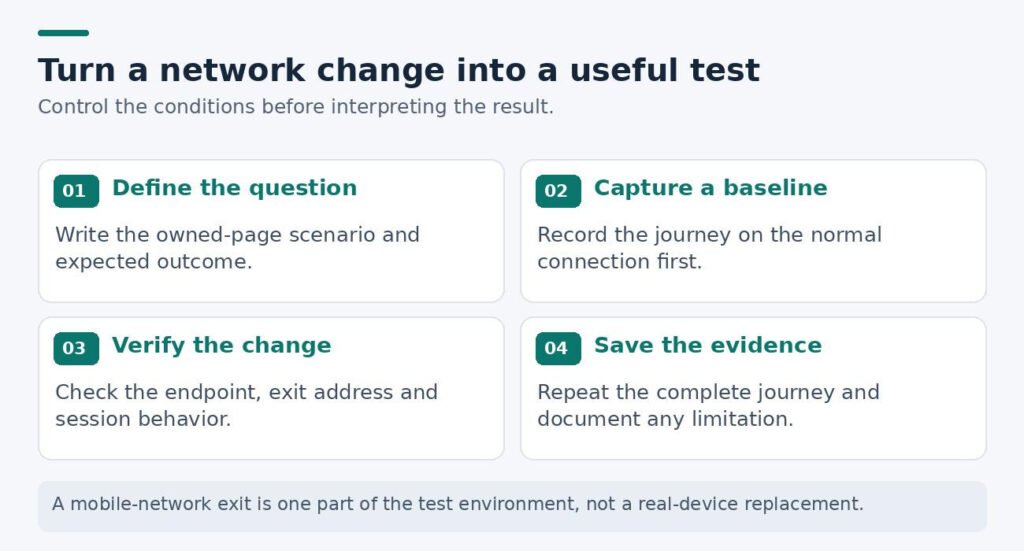
Figure 1. A useful mobile-network check starts with a defined task and ends with evidence another person can review.
Step 3. Decide when the connection must stay stable
What needs to stay constant?
For a multi-step journey, such as signing in to an account you manage or moving through your own checkout, continuity may be more important than obtaining a new address. Decide whether the same network exit needs to remain in use throughout the test.
Also keep the browser version, language, cookies and test account consistent when investigating a network issue. Changing all of them at once makes the outcome difficult to interpret.
What needs to change?
Rotation is useful when the test genuinely requires a different network exit between scenarios. Decide when that transition should happen and record it. Unplanned changes in the middle of a journey can make a failure harder to diagnose.
A rotation command is not, by itself, evidence that the exit changed. Check the observed address after the operation and record the result. Avoid treating every reconnect as a guaranteed new identity.
What is the destination supposed to do?
Confirm the expected currency, page or cart behavior against the test brief.
The expected result comes from the site's specification, not from the proxy.
| Test objective | Connection approach | Evidence to retain |
|---|---|---|
| Complete a multi-step journey | Keep the exit stable where possible | Start and end address; journey result |
| Check a regional landing page | Choose the required network location | Observed location; displayed offer |
| Compare network behavior | Change one network variable at a time | Matching timestamps and page timings |
| Validate rotation controls | Rotate between independent scenarios | Address before and after rotation |
Checkpoint: Rotation occurs between independent tests, not accidentally inside a journey that needs continuity.
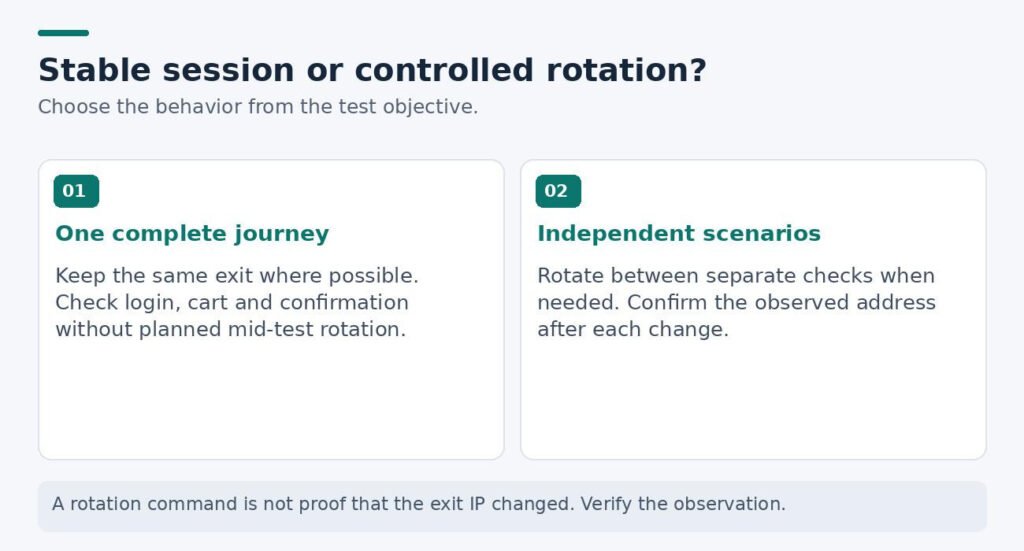
Figure 2. Keep the exit stable within a multi-step journey; rotate only between scenarios that require a different exit.
Step 4. Configure the client and verify the actual exit
Check the protocol, host, port, authentication method and session settings against the endpoint's documentation. Enter them in the application you are actually testing. Keep a separate, protected configuration record rather than placing credentials in the campaign brief.
MDN's guide to proxy servers and tunneling explains how HTTP CONNECT can establish a tunnel used for HTTPS traffic. The practical point is that a protocol name and the security of the entire connection are different questions. Verify the actual configuration rather than assuming that the word "proxy" describes encryption end to end.
Do not disable certificate validation just to make a test pass. Investigate unexpected certificate warnings, and keep proxy credentials out of screenshots, source repositories and shared campaign documents.
Check the scope of the configuration as well. A browser setting does not necessarily route every other application on the machine. Where DNS or application-specific traffic matters to your test, verify the behavior of that client rather than assuming a system-wide change.
Confirm the observed exit before testing the page
Use an IP-check endpoint or a server you control to confirm the observed exit. Compare the result with the selected listing and note any discrepancy before testing the campaign itself.
Treat location labels as observations to verify, not a substitute for the user experience. A regional content rule may also depend on account settings, browser language or other inputs.
Checkpoint: The observed exit and configured client match the intended test; credentials and certificate checks remain protected.
Step 5. Run the full journey and repeat the check
Follow the entire customer journey, not just the first page request. For an owned checkout, check the product page, cart continuity, approved test-payment stage and final confirmation. Write down where the first unexpected result appears.
Keep the workload modest and within the destination's rules. Stop when repeated errors appear instead of increasing request volume to force a result.
Repeat with the important settings unchanged
Repeat the same scenario at more than one time, keeping the important variables unchanged. Record each observation separately. A small sample can reveal an obvious configuration problem, but it cannot establish an uptime guarantee.
When a session fails, preserve enough detail to investigate: timestamp, endpoint, error message and whether the baseline also failed. Remove credentials and personal information before sharing the report.
Checkpoint: Each run records its conditions and outcome; repeated errors trigger investigation rather than more traffic.
Step 6. Diagnose one variable at a time
| Symptom | First question to investigate |
|---|---|
| Authentication fails immediately | Are the endpoint and credentials entered correctly? |
| The connection works, but the page is wrong | Are language, account and location rules aligned? |
| A journey breaks after rotation | Did the network exit change during a stateful task? |
| Everything becomes slow | Does the baseline also slow down at the same time? |
| The reported location differs | What does the listing promise, and how was location checked? |
These are starting questions, not diagnoses. Keep observations separate from explanations that still need testing.
Checkpoint: The report separates the symptom, the suspected cause and the next controlled check.
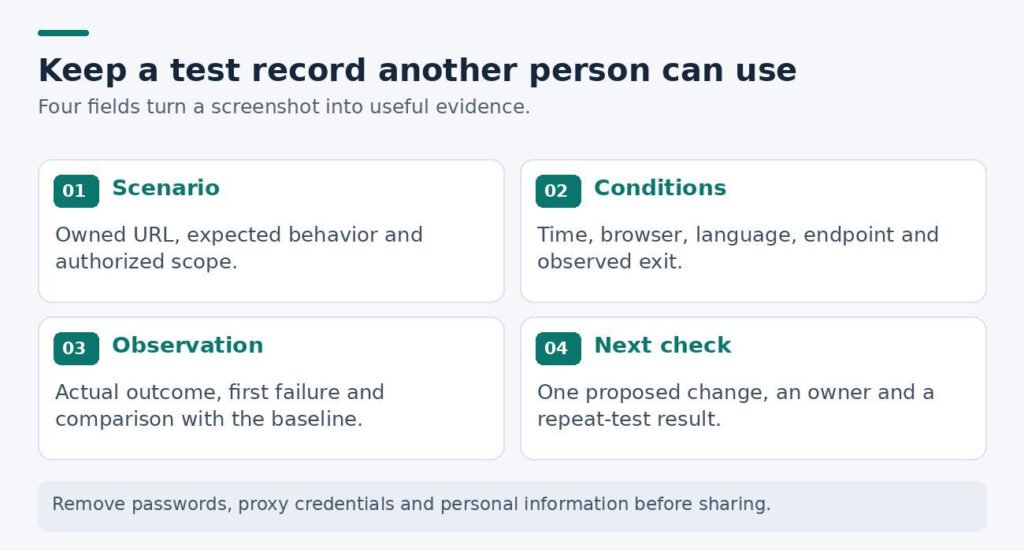
Figure 3. A compact test record makes failures easier to reproduce and keeps observations separate from explanations.
Step 7. Review the evidence and prepare a handover
Decide whether the connection helped answer the original question. Review completed scenarios, unresolved errors, setup time and the cost of the actual test period. A fast first page is not enough when the complete journey remains unreliable or unexplained.
Judge configurations by the same approved scenarios, not the fastest isolated page load.
Give support a timestamped problem or a precise session question. Evaluate whether the answer helps resolve it.
Save the approved settings, permitted changes and renewal owner. A colleague should be able to repeat the test and replace credentials without guessing.
Checkpoint: A colleague can repeat the test from the approved settings and understand the limits of the conclusion.
Report what the test actually establishes
A mobile proxy changes one part of the environment. It does not replace a real-device test or guarantee account safety, anonymity or access. A useful report states the approved scenario, the observed network conditions, the result and the limitations—so the next decision rests on evidence rather than a product label.

