TrafficArmor: The Best Cloaker for Affiliate Marketers

Every cloaker promises to keep reviewers away from your offer. Only one lets you try to beat it before you pay a cent. TrafficArmor earns the title of best cloaker for affiliate marketers on one point nobody else can match: it catches 100% of residential and mobile proxies, the disguise moderators and competitors now use by default, and it backs that claim with a public demo you can attack from your own connection, without you even having to register.
If you have ever lost a profitable campaign overnight and never found out who slipped through, this article is for you. We will look at why most cloakers fail quietly, how TrafficArmor makes its decisions, and how to check everything here in about two minutes.
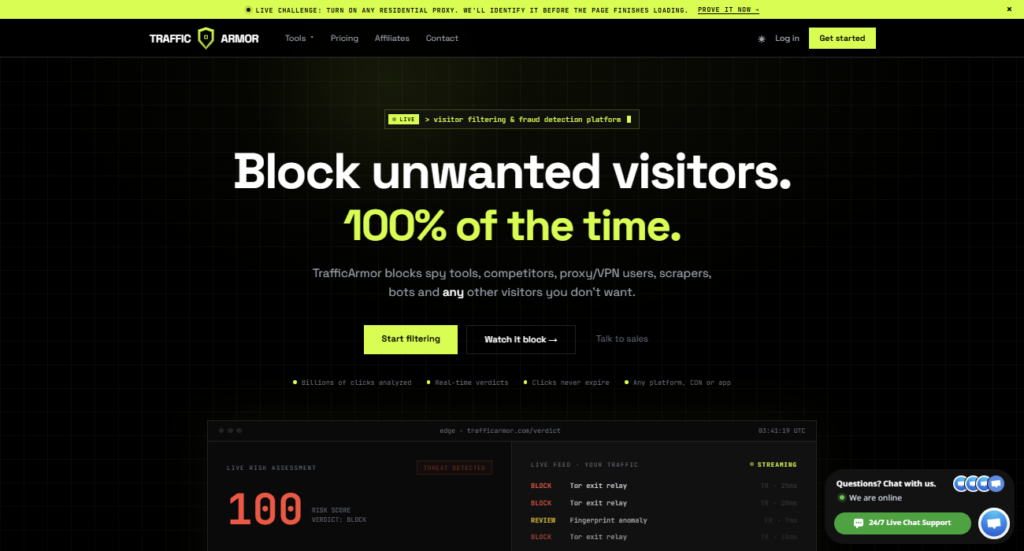
Why most cloakers fail without telling you
A cloaker has one job: decide, in the instant between the click and the page load, who sees your offer and who sees a harmless safe page. The trouble is that a bad decision is invisible. When a reviewer gets through, nothing in your stats looks wrong. You just wake up to a disabled account and a budget you will never see again.

The people you want to keep out learned long ago that obvious tricks get caught. Server IPs are flagged, so they stopped using them. Simple geo and timezone checks are easy to satisfy, so they set their browser to match. Today the standard move is to borrow a real household or phone connection through a residential or mobile proxy. The address belongs to a normal internet provider in the right city and has a clean history, so a cloaker that leans on reputation lists treats it as a genuine buyer.
That is the gap that decides whether a cloaker is worth paying for. Ask any vendor whether they block proxies and the answer is always yes. Ask them to prove it on a fresh address that no database has seen, and the conversation usually ends.
How TrafficArmor makes the call
TrafficArmor does not ask "have we seen this IP before?" It asks "does everything about this visit add up?" Each click is examined in real time across the browser, the device and the network connection, and a verdict comes back in under 50 ms, so real visitors never notice a delay.
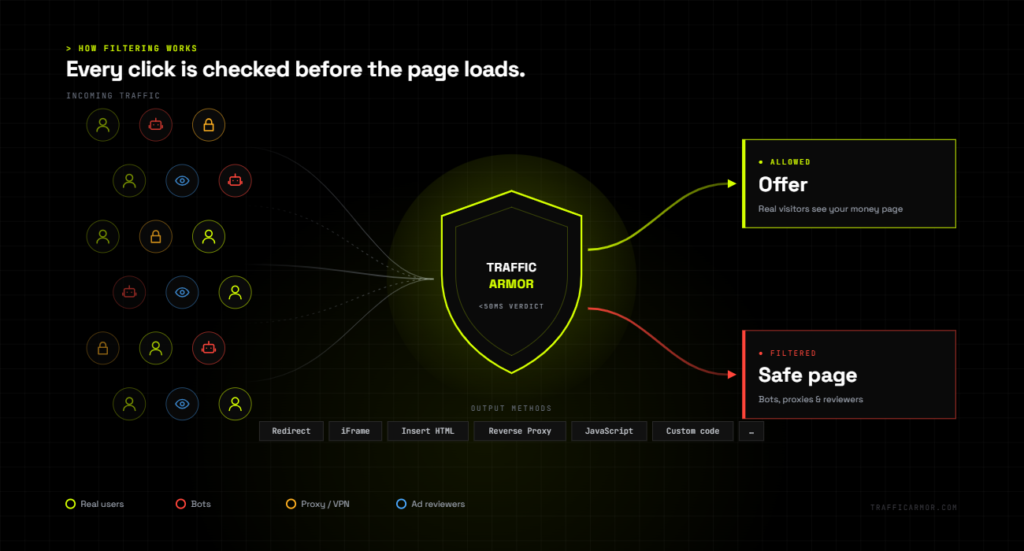
The decision happens before anything renders: buyers get the offer, everyone else gets the safe page
What it catches:
- Residential and mobile proxies - all of them, even when the proxy sits next door to the real device and its address is brand new to every blacklist.
- VPN, Tor and server connections - the classic giveaways, covered on every plan.
- Fake devices - emulated hardware, VMs and forged browser identities, such as a "phone" that reports no touchscreen and no sensors.
- Connection fingerprints - TLS and TCP signals that reveal what a visitor is really running, whatever the browser claims.
- Repeat visitors in disguise - the same person returning on new IPs, new providers or new devices.
There is also the advantage of scale, and it is the reason TrafficArmor stays in front. As the biggest and oldest cloaker in the market, filtering traffic for more than a decade, it has a bird's-eye view no smaller platform can match: when reviewers change tactics, TrafficArmor sees it first. Its own research team keeps adding new tests, and competitors routinely take years to catch up. It was one of the pioneers of matching IP location against device timezone, a check that is now standard everywhere. Every account also benefits from anonymized signals shared across the whole network, so a threat spotted on one campaign strengthens protection for everyone.
The two-minute proof: the public demo
Here is the part that sets TrafficArmor apart from every competitor. You do not have to take any of the above on trust. Open the public demo at demo.trafficarmor.com and try to get past it, without you even having to register.
The test takes a couple of minutes:
- Connect through a residential or mobile proxy. Pick the most expensive, cleanest provider you can find; that is the point.
- Load the demo page and read the verdict.
- Disconnect the proxy and reload.
- Repeat with as many providers and locations as you like.
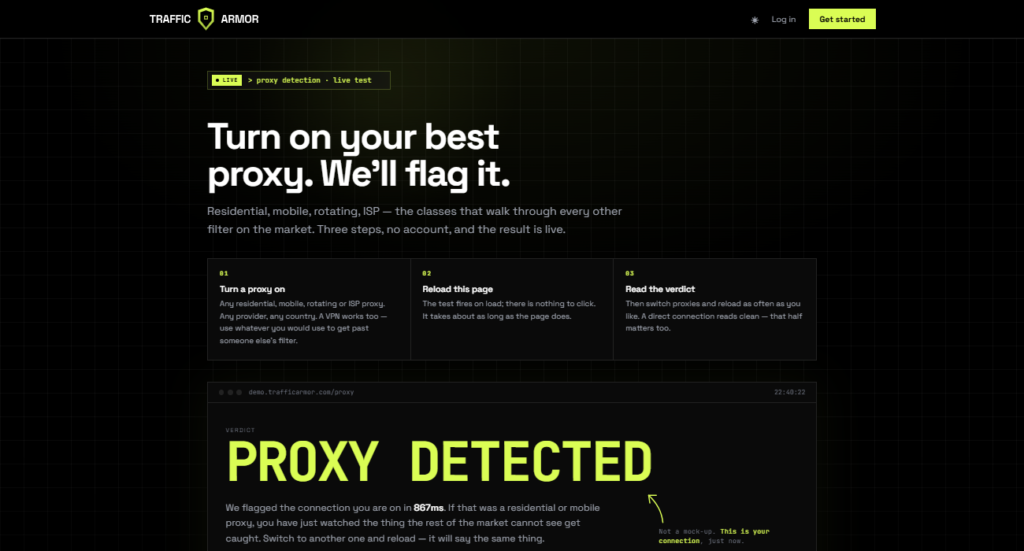
Proxy on, verdict in: the demo spots the borrowed connection
Keep in mind what you are looking at: an early build of a single detection method, not the complete production filter, which goes much further. It is still the easiest objective proof in the market, and a useful yardstick: ask your current cloaker for a page like this. If they cannot offer one, you already know why.
Setup that fits any stack
Good detection is useless if it takes a week to install. TrafficArmor offers more integration methods than most buyers will ever need, and you choose one per campaign right in the dashboard:
- Custom API - your code asks, TrafficArmor answers pass or fail.
- Mobile apps - filtering built straight into your app.
- Hosted HTML - aim a domain at TrafficArmor and forget about hosting.
- PHP - one file on your server.
- JavaScript - use the hosted copy or keep the file on your side.
- Reverse proxy - traffic flows through an edge node and the address bar never changes.
- CDN and site builders - paste a tag into Shopify, Wix, S3 and similar platforms.
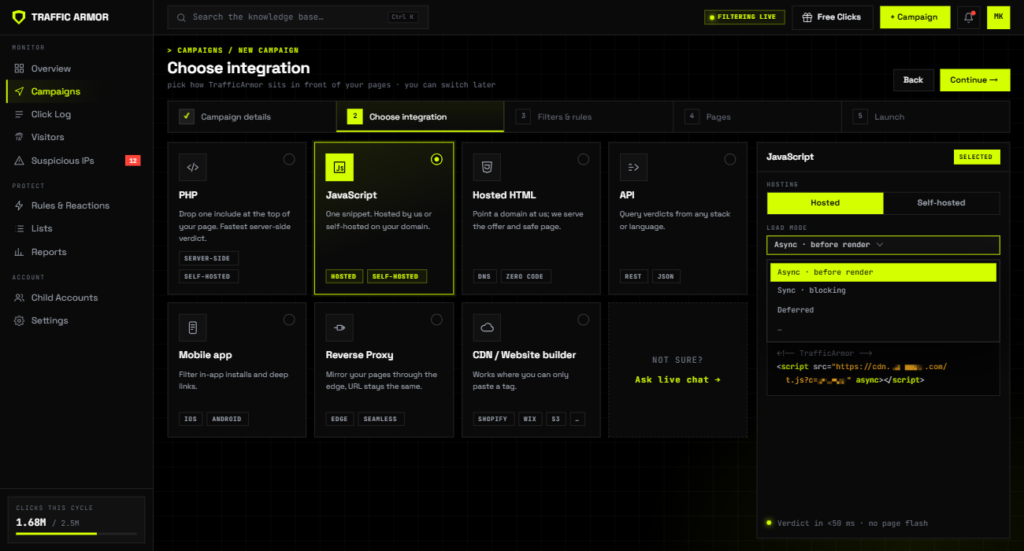
Picking an integration method while creating a campaign
You also decide exactly how each audience is served: a redirect, an iFrame, inserted HTML, a full reverse-proxied site, a script snippet, files stored on your server or fully custom logic. Typical setups are running within minutes.
Seeing who actually clicked
A cloaker should not be a black box. All plans include a full log of clicks and visitors, each with its verdict and why it was given, so you can audit what happened instead of guessing.
The visitor view is where this pays off. Take one real case: the same person returned 19 times, rotating through 5 IPs, 4 providers and 3 devices, once via a VPN. TrafficArmor linked all of them to the same fingerprint and blocked 19 out of 19.
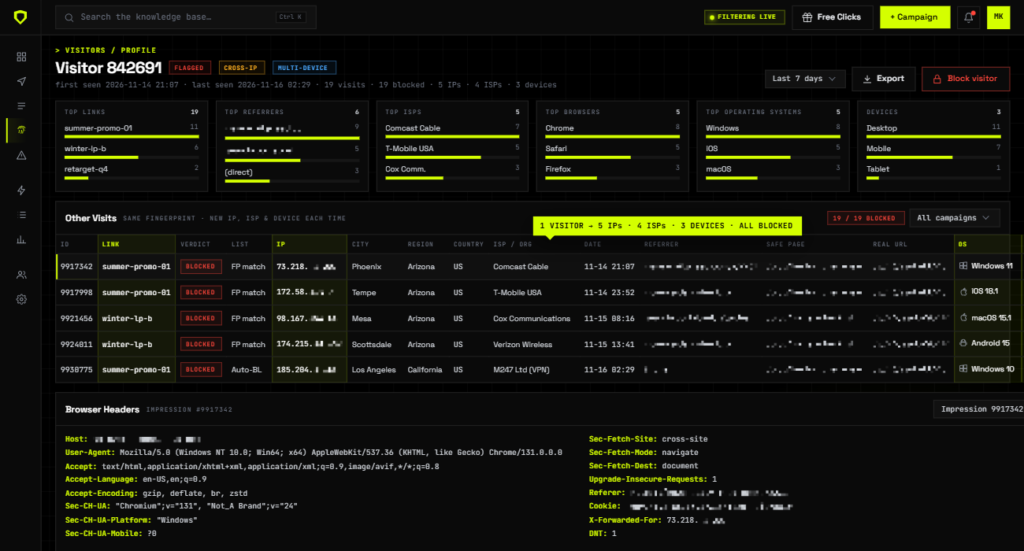
One visitor, five IPs, four providers, three devices: every visit blocked
The opposite trick fails as well. A single home address in Denver posed as an iPhone on Safari, a Windows PC on Chrome and a Linux box on HeadlessChrome, hitting three campaigns in under three hours. No real household behaves like that, so TrafficArmor blocked every visit.
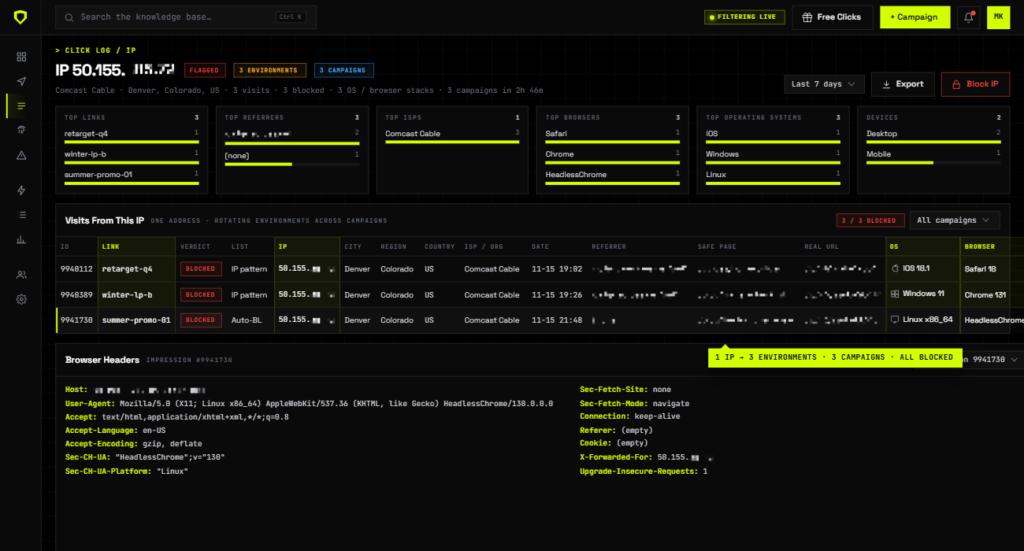
One IP, three environments, three campaigns, all blocked
Beyond your own traffic, the Suspicious IPs screen reveals which addresses keep appearing in links other accounts had to shut down, rates the risk and lets you block them with one click.
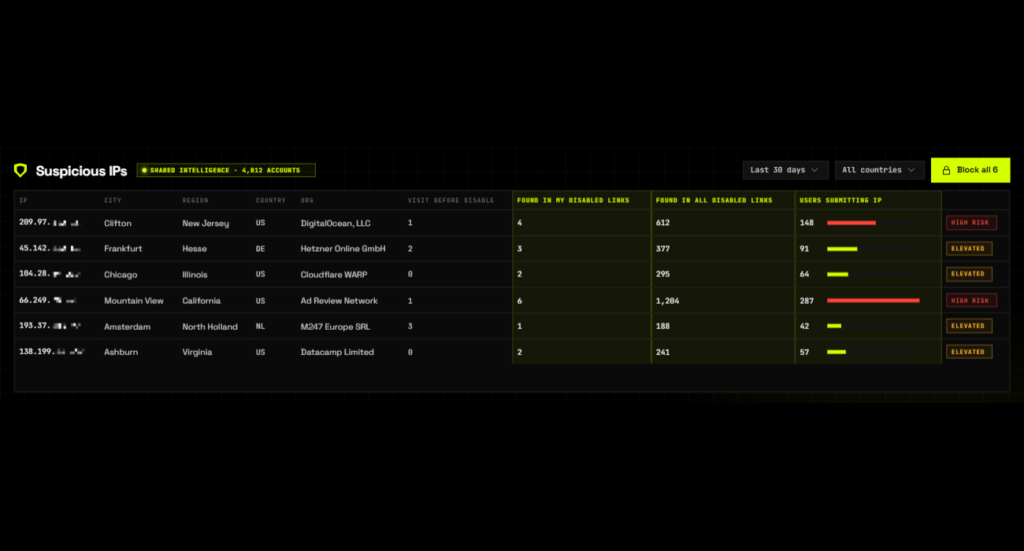
Network-wide signals with a risk rating for each address
Automation and teamwork
Campaigns do not stop at midnight, and neither should your defenses. With Rules and Reactions you define triggers such as traffic volume, ISP or company, geography, specific IPs or the percentage of blocked visits, and pick what happens next. Say watched campaigns fall under 50 clicks within 10 minutes: TrafficArmor can alert you by email, lock all watched links and ping your traffic source's API on its own.
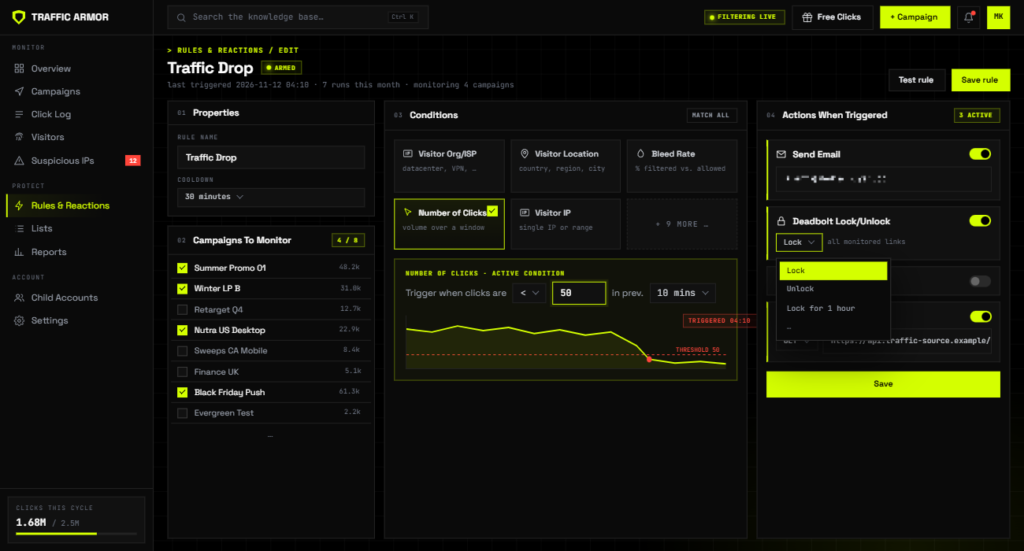
Traffic Drop rule: the alert, the lockdown and the API call fire by themselves
Teams can open as many child accounts as they need, all drawing on a single click balance. Every buyer works in a private login with their own campaigns and logs, managers get their own role, and nobody pays per seat.
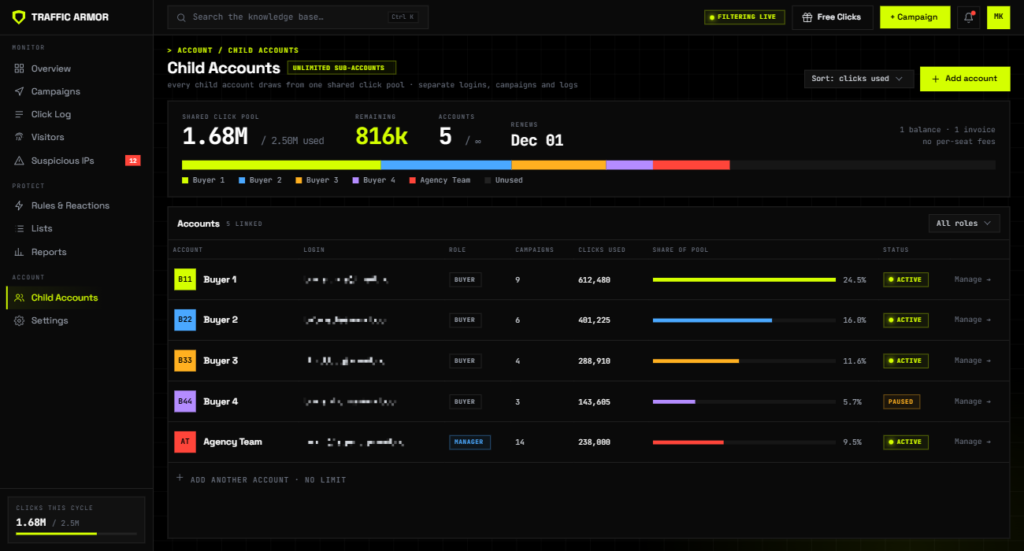
Separate logins and roles for every buyer, one balance for the team
Pricing that does not punish you
Plans start at $129 per month, and every plan gets the same full detection. You pay for volume, never for accuracy. A few details affiliates tend to appreciate:
- Clicks you do not use roll forward with no expiry while the account stays open.
- The API comes with every plan, not just the top tier.
- No lock-in: cancel whenever you want and your remaining clicks stay yours.
- Big spenders pushing past 750,000 clicks a day, and agencies, can negotiate custom terms.
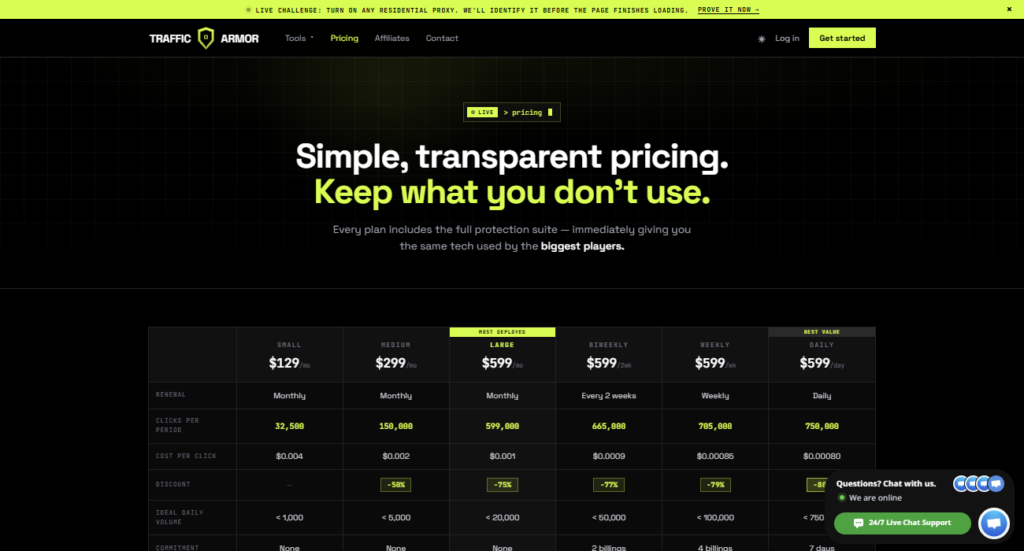
Same detection on every tier; only the click volume changes
Stuck at 3 a.m.? Live chat on the website runs 24/7, staffed by people who know cloaking inside out.
The verdict: the best cloaker for affiliates
- It is the only cloaker that works and publicly proves it: a demo anyone can test against their own proxies.
- It stays ahead: new tests ship first at TrafficArmor, while others take years to catch up.
- It sees changes first: as the biggest and oldest cloaker, it has a bird's-eye view of the whole market.
- It gets stronger with every user: anonymized signals shared across the network improve results for all accounts.
- It catches the visitors that matter: 100% of residential and mobile proxies, plus VPNs, Tor, datacenters and fake devices.
- It fits any setup: API, scripts, hosted pages, reverse proxy, apps and site builders.
- It shows its work: full click and visitor logs on every plan.
- It has proven itself again and again, and keeps doing it: more than a decade of protecting affiliate traffic for 20,000+ users.
Get started
Run the demo first. If your favorite proxy cannot get through, you have your answer. Then head to trafficarmor.com to compare plans, or sign up here for expedited approval.
As an AffCommunity reader, you save 15% on every TrafficArmor plan, for life, with promo code AFFCOMMUNITY.